Porsche Design
Technical details
Movement
Calibre ETA Valgranges A 07 111 with Eterna module.
Mechanical movement with automatic winding.
Vibratlons/h: 28,000.
Power reserve: Approx. 45 hours.
Display
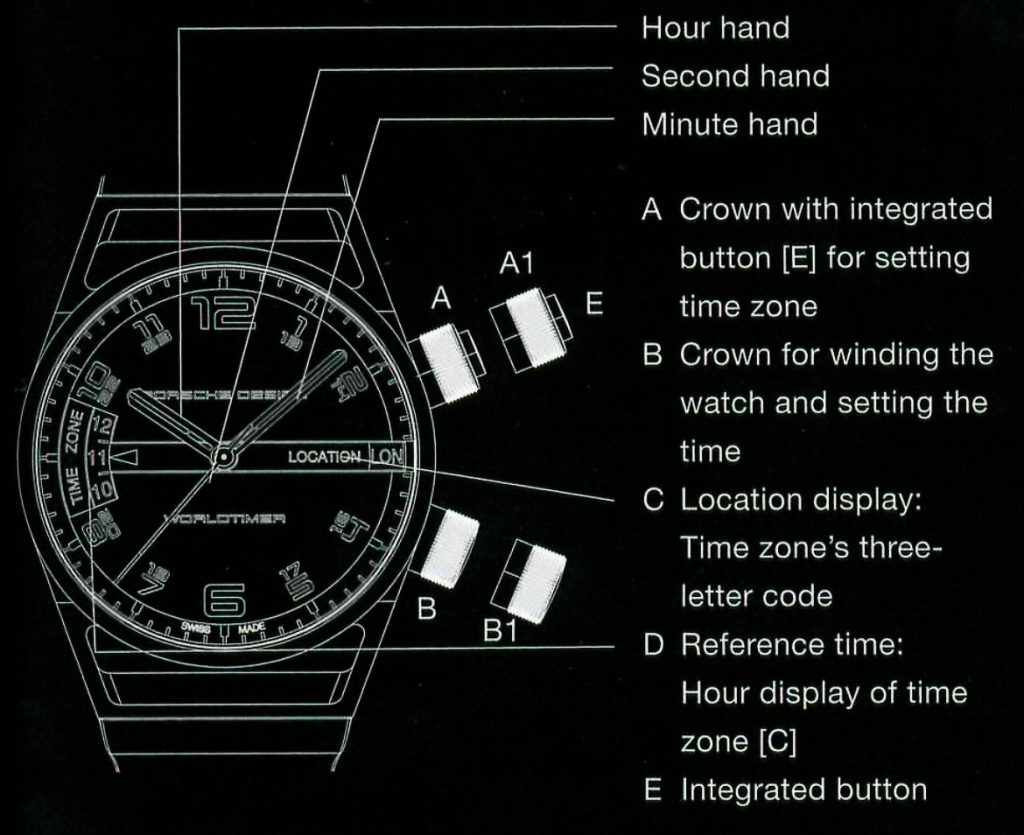
Hour, minute and second are displayed by the centre hands. The location and hour of the second time zone are displayed in windows [C) and [D) on the dial.
The time in the second time zone [O) runs parallel to the time shown by the hands in accordance with the location selected under [C).
Case
The case is made from titanium [matt finish or black PVD There is a button [E] on crown [AJ. The button cannot be coatingJ or gold. Two screw-down crowns. Titanium or gold used unless the crown [AJ has been screwed down. lf the case back held in place with six screws. crown [AJ is unscrewed, the button is disabled.
Case diameter: 45 mm; Case height: 16.8 mm.
Water resistance: 100 meters.
Crowns
Two screw-down crowns [AJ and [BJ. Unscrew by turning counterclockwise. Tighten by turning clockwise. The unscrewed crowns can be pulled to position [A1J and [B1J.
Important: Never unscrew both crowns at the same time.
Dial
Hands and indices are coated with luminous material to make lt easier to read them in the dark. Outer ring with
minute scale. LOCATION [C] indicates the relevant reference location of any time zone. TIME ZONE [DJ indicates the
current hour in the time zone selected under LOCATION [C]. One crown always remains screwed down when the other Is
unscrewed and is being used.
Functions
Basic setting
If the watch has not been worn for an extended period of time and has stopped, you must configure the basic
settings.
1. Winding the watch up. [See ‘Winding the watch’J
2. Unscrew the crown [AJ by turning it counterclockwise and pull it out to position [A 1 J.
3. Set the time zone [CJ that you are in at that time by turning the crown.
4. Push the crown [AJ back In and screw down into the case by turning clockwise.
5. Press button [E]. The hands are synchronized with the reference time [DJ.
6. Unscrew the crown [B] and pull it out to position [B1J: Set the current time on the hands by turning the crown.
7. Push the crown [AJ back in and screw down into the case.
8. Your World timer has now been correctly set.
Winding the watch
The mechanical movement winds automatically when the watch is worn. The Porsche Design rotor supplies energy to
the main spring in response to the very slightest of wrist movements. There Is no need to wind up the watch
manually as long as it is worn regularly. lf the watch is not used for an extended period of time, it
can be wound up by means of the crown (BJ. Unscrew the crown [B] by turning counterclockwise. Turn the unscrewed crown a few times clockwise to wind the watch up. Then push the crown [BJ back in and screw it clockwise into the case.
lmportant
Please note that both crowns [Al and [B] cannot be used simultaneously. If one of the two crowns is loosened and is
being used, the other crown always remains screwed down.
Setting the time
The minute and hour hand can be set with crown [B].
Unscrew the crown by turning counterclockwise. Then pull out the crown to position [81]. The second hand stops immediately. Set the time by turning the crown. With the second hand stopped, you can set the hour and minute hands exactly. Then return the crown to the original position.
The second hand starts moving again. Press the crown gently against the case and screw lt into the case by turning it clockwise. The second time zone’s digital display [D] is adjusted in coordination with the hands.
Setting location and time zone, a reference location from among the 24 world time zones can be set in the display [C] with the crown [AJ. Unscrew the crown [AJ by turning counterclockwise. Pull the crown out to position [A 1) and turn it; it can be turned in both directions.
The reference location is shown with a three-letter code.
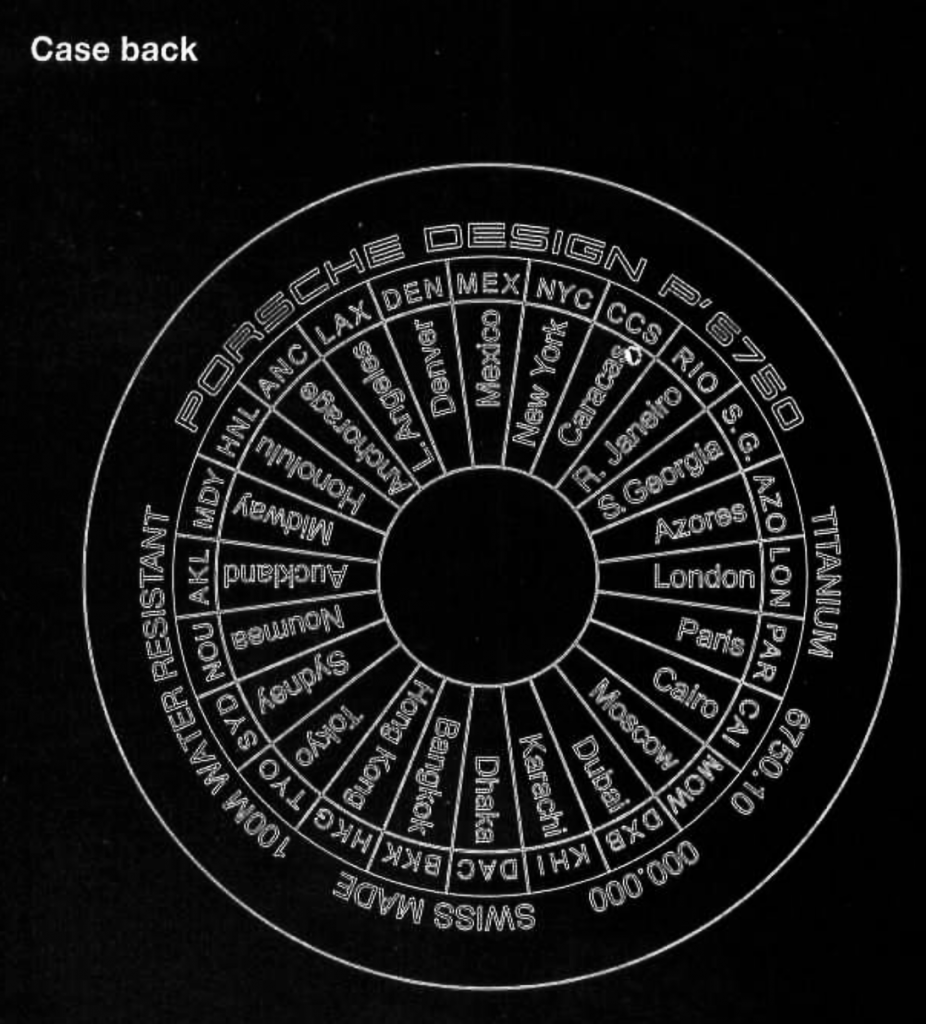
The three-letter code and the 24 reference locations are engraved on the case back. Once the desired reference Location appears In the display [C), push the crown back in.
Then screw the crown into the case by turning clockwise.
The display [D] now indicates the hour in the given time zone [C]. The time in the chosen time zone runs parallel to the time shown by the hands.
lf you now wish to transfer the time at the reference location to the hands of the dial, push the button [E] on the crown [A]. The hour hand immediately jumps to the hour indicated in the display [D). While changes are being made to the watch’s time zone function, the automatic movement continues to run unimpeded – not one second of the original setting is lost when changing the time zone.
Setting location and time zone
A reference location from among the 24 world time zones can be set in the display [C] with the crown [AJ. Unscrew the crown [AJ by turning counterclockwise. Pull the crown out to position [A 1) and turn it; it can be turned in both directions.
The reference location is shown with a three-letter code.
The three-letter code and the 24 reference locations are engraved on the case back. Once the desired reference Location appears In the display [C), push the crown back in.
Then screw the crown into the case by turning clockwise.
The display [D] now indicates the hour in the given time zone [C]. The time in the chosen time zone runs parallel to the time shown by the hands.
lf you now wish to transfer the time at the reference location to the hands of the dial, push the button [E] on the crown [A]. The hour hand immediately jumps to the hour indicated in the display [D). While changes are being made to the watch’s time zone function, the automatic movement continues to run unimpeded – not one second of the original setting is lost when changing the time zone.
An example of how to set the location and time zone
Mr M lives in Switzerland, meaning he lives in the Central European Time zone [PAR], whlch is Paris. The hands on his Porsche Design Worldtimer indicate 10 o’clock In the morning. Mr M would like to set the time zone for New York [NYC] with the crown [AJ since he is on the flight to New York. He unscrews the crown [AJ, pulls it to position [A1] and rotates the disk [C] until [NYC] appears. The number 04 appears in the display [O], meaning that it is 4 o’clock in the morning in New York. As soon as Mr M has landed In New York, he would like to transfer the new time zone to the hands as the main time. He presses button [E] on the crown [A] – and the hour hand jumps immediately from 1 O to 4.
The dial now indicates the time in New York.
Care and Service
Care
To ensure your watch keeps its accuracy and its good looking appearance for as long as possible, clean it regularly with clear, lukewarm water and a soft brush. The watch should always be rinsed with fresh water after contact with saltwater.
Note on water resistance
The Worldtimer Is water resistant down to a diving depth of 100 meters. To achieve this high level of water resistance, the watch has screw-down crowns and case back. However, please note the following: Details about the level of water resistance are simple snapshots and not values guaranteed for lite. Handling the watch, aging processes in the packing material and/or severe temperature fluctuations can affect even the most water resistant of cases. Water may enter the
watch and can lead to expensive repairs. We recommend that you have the watch inspected regularly by an expert.
Service
Have the water resistance checked annually in a Porsche Design service center. You should have the movement inspected every three to tour years so that the movement can be cleaned and lubricated by qualified watchmakers.
Please refer any questions to your Porsche Design specialist dealer.
You can find more information and addresses at:
www.porsche-design.com